Human Checkpoint · field service

YubiKey 5.8 · previewSign · ARKG

Hardware-bound approvals for AI service workflows

The agent can ask. Only a human can answer.

An AI agent prepares a field-service job: it reviews the request, reads approved service history, and drafts a technician brief. It cannot take either consequential step on its own. A technician approves each one by touching the same enrolled YubiKey 5.8 — and each touch signs the exact bytes on screen under a different request-scoped key.

Most systems put the hardware key at the front door. Human Checkpoint puts it inside the agent's action boundary, at the two moments where the agent would otherwise act alone.

The problem

Agents are getting real authority. Approval hasn't kept up.

AI agents increasingly take consequential actions — they search, spend, dispatch, and close work orders. The two controls usually placed around them do not actually bind a human to any specific action:

  • A login at the front door. A session authorises everything the agent does for as long as the token lives. Nobody approved this action; somebody approved the day.
  • An audit log afterwards. It records what a system claims happened, and whoever controls the database controls the record. It proves nothing to anyone outside.

In field service the gap is concrete. An agent drafts a work order from past service history. If it releases that order unchecked, a pump goes back into service on an AI's judgement, and the only evidence is a log row the vendor wrote about itself.

Our solution

Put the hardware key inside the agent's action boundary rather than at the front door.

  • ✓ Before each consequential step, the exact decision is canonicalised to bytes and shown to the technician.
  • ✓ One touch on a YubiKey 5.8 signs those bytes — not a session, not a summary.
  • ✓ The runtime re-fetches and re-validates that signature before it acts. No signature, no action.
  • ✓ The result verifies offline, by anyone, with no access to our systems.

You can check that last claim yourself further down this page — it runs real signature verification in your browser.

Recorded walkthrough

Watch the real ceremony

The operational workflow after one-time enrollment, including both physical YubiKey touches. The agent-task wait is accelerated; the field-inspection intertitle marks an off-screen time jump. The requests, signer prompts, approvals, and verification are unaltered.

Recorded on the live product UI. Enrollment is stated on the opening card and remains available on the dedicated hardware setup page; the recording begins with an assigned service request.

Download the recording · open in a new tab ↗

Annotated walkthrough

Walk the technician's flow

Step through the workflow. The right-hand panel tracks what the agent is permitted to do at each stage.

This section is narration, not a live system — the real workflow needs Docker, MoltNet, Ory, Node-RED, the agent daemon, the signer companion and a physical key. To actually execute the authorization logic, use the gate console below, which runs the shipped code.

    Step

    …

    Agent capability right now

      Interactive · real code

      Run the real authorization gate

      The buttons below call assertApprovedCheckpoint() — the same compiled function from @human-checkpoint/core that the agent runtime calls before it is allowed to touch a public source. It is loaded into this page unmodified, and it decides against the real recorded approval from the evidence bundle.

      What this is not: it does not contact MoltNet, and it does not perform a ceremony. It replays a recorded approval through the genuine gate, so the verdicts and reason strings are produced by the shipped code rather than written for this page. Expiry is evaluated as of the moment the approval completed.

      Ask the gate for permission

      Each button changes one thing about what the caller claims, then asks the gate.

      Pick a case above to call the gate.

      How we use YubiKey 5.8: previewSign and ARKG

      The key is not proving who is logged in. It is signing what is about to happen. Before each touch, MoltNet fixes the exact decision — queries, domains, result limit, reason, team, purpose, expiry — and canonicalises it to bytes. The signature covers those bytes.

      previewSign is a YubiKey 5.8 firmware-preview extension. Its useful property here is ARKG: MoltNet can derive a fresh public key for each signing request and prepare verification material before the private operation happens, while the private key never leaves the key.

      That is why one physical key produces two different public keys below. Each decision is separately attributable; neither can be replayed as the other.

      What a valid signature proves

      • ✓This exact decision was shown to a human
      • ✓That human touched an enrolled key
      • ✓Not one byte changed afterwards
      • ✕That the maintenance decision was correct
      • ✕Anonymity — claimant and credential IDs are retained by design

      Enrollment, and why it takes two people
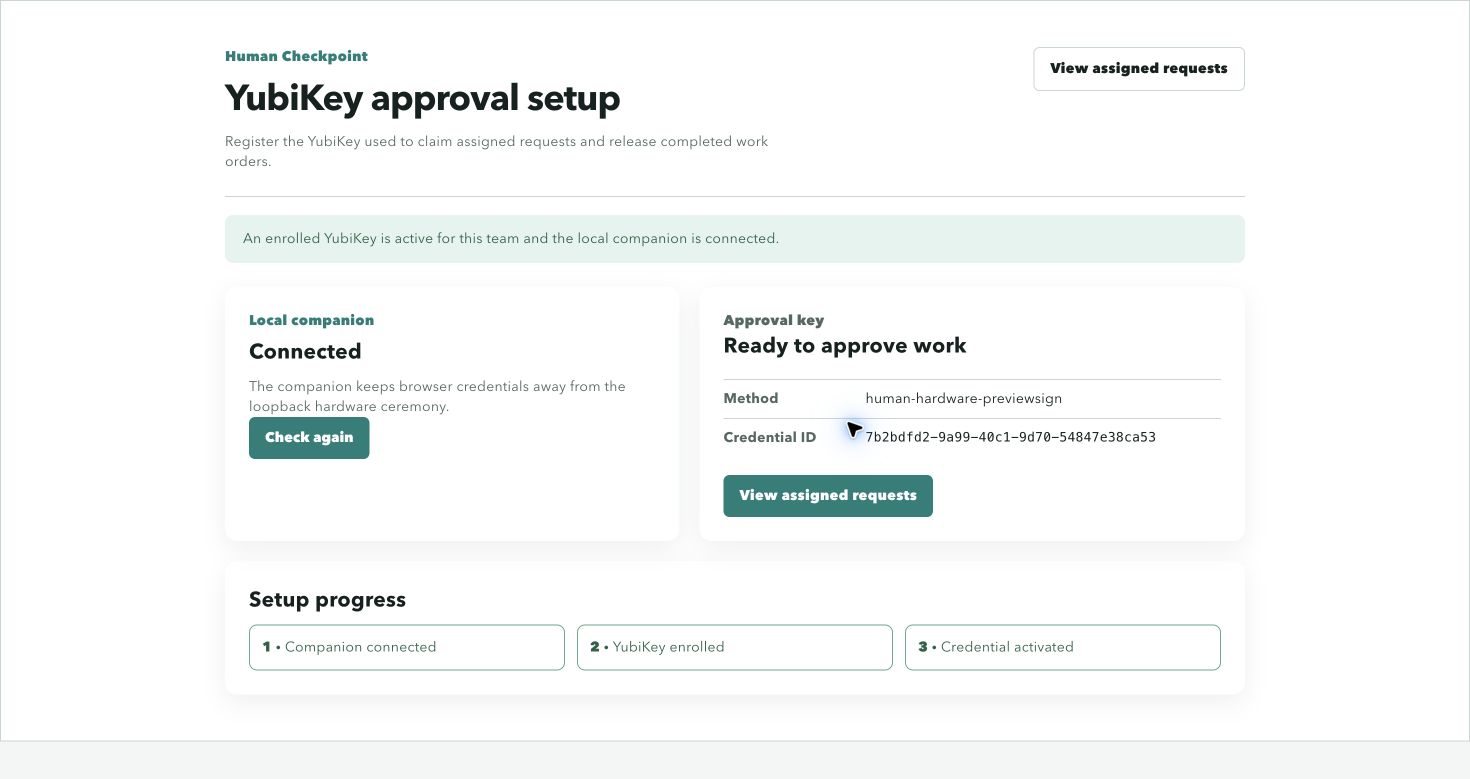
      YubiKey approval setup page: local companion connected, approval key ready with method human-hardware-previewsign and a credential ID, and setup progress showing companion connected, YubiKey enrolled, credential activated
      The ready state the technician sees before any work is claimed.

      Enrollment registers the outer credential and the ARKG seed that later derives every per-decision key. The page reports the method (human-hardware-previewsign) and the credential ID, so the technician can tell which physical key is bound to this team.

      The three-step progress rail is the whole trust chain: the loopback companion connects, the key enrolls, and then a second person activates the credential. MoltNet refuses to let a credential owner approve their own credential, so enrollment alone grants nothing.

      Capability is detected, never inferred from a version string — the signer confirms the key advertises previewSign and refuses an ambiguous multi-device selection.
      Ecosystem gap

      There was no Node.js path, so we built one

      previewSign is the primitive this project stands on. Reaching it from Node.js turned out to be the hard part.

      Yubico's own build-with-us quickstarts cover iOS/macOS, Android, .NET and Python — there is no JavaScript or TypeScript path. And the browser cannot help: the WebAuthn extension that would expose this to web pages, w3c/webauthn#2078, has been a draft since September 2024. No browser ships it.

      So we wrote the missing layer and published it under MIT, so anyone hitting the same wall can use it without adopting our licence.

      Usage, enrollment, signing and verification: docs/nodejs-previewsign.md.

      What we published

      • ✓ @themoltnet/ctap · MIT
        Minimal CTAP2/HID transport for Node.js.
        npm · source
      • ✓ @themoltnet/yubikey-preview-sign · MIT
        Enrollment, ARKG derivation, signing, offline verification, and conformance test vectors.
        npm · source
      • ✓ @themoltnet/signer · AGPL-3.0-only
        Loopback companion that lets a browser reach a key the web platform cannot yet address.
        npm · source · docs

      The verifier further down this page runs that library's browser-safe verification path — it deliberately pulls in no HID or CTAP code, so verification runs where the hardware never goes.

      Who holds which authority

      Three systems, each authoritative for one thing. No component trusts its own cache when an approval is on the line.

      Component Authoritative for The rule that makes it hold
      YubiKey 5.8 The human decision itself Private key never leaves the device. ARKG derives a distinct public key per signing request.
      MoltNet Identity, tasks, signing requests, runtime profile Every approval is re-fetched before it can unlock an action. The runtime profile pins toolEnforcement: enforce, an allowed-host sandbox of api.exa.ai only, and no unattended shell.
      Node-RED Durable orchestration Stable workflow IDs, idempotent steps, append-only events in SQLite. A cached "completed" can never unlock a call or a release.
      The model Nothing consequential Its public-source tool accepts only a signing-request ID and re-derives every query, domain, and limit from the signed message. It can name which approval to use, never what it authorises.

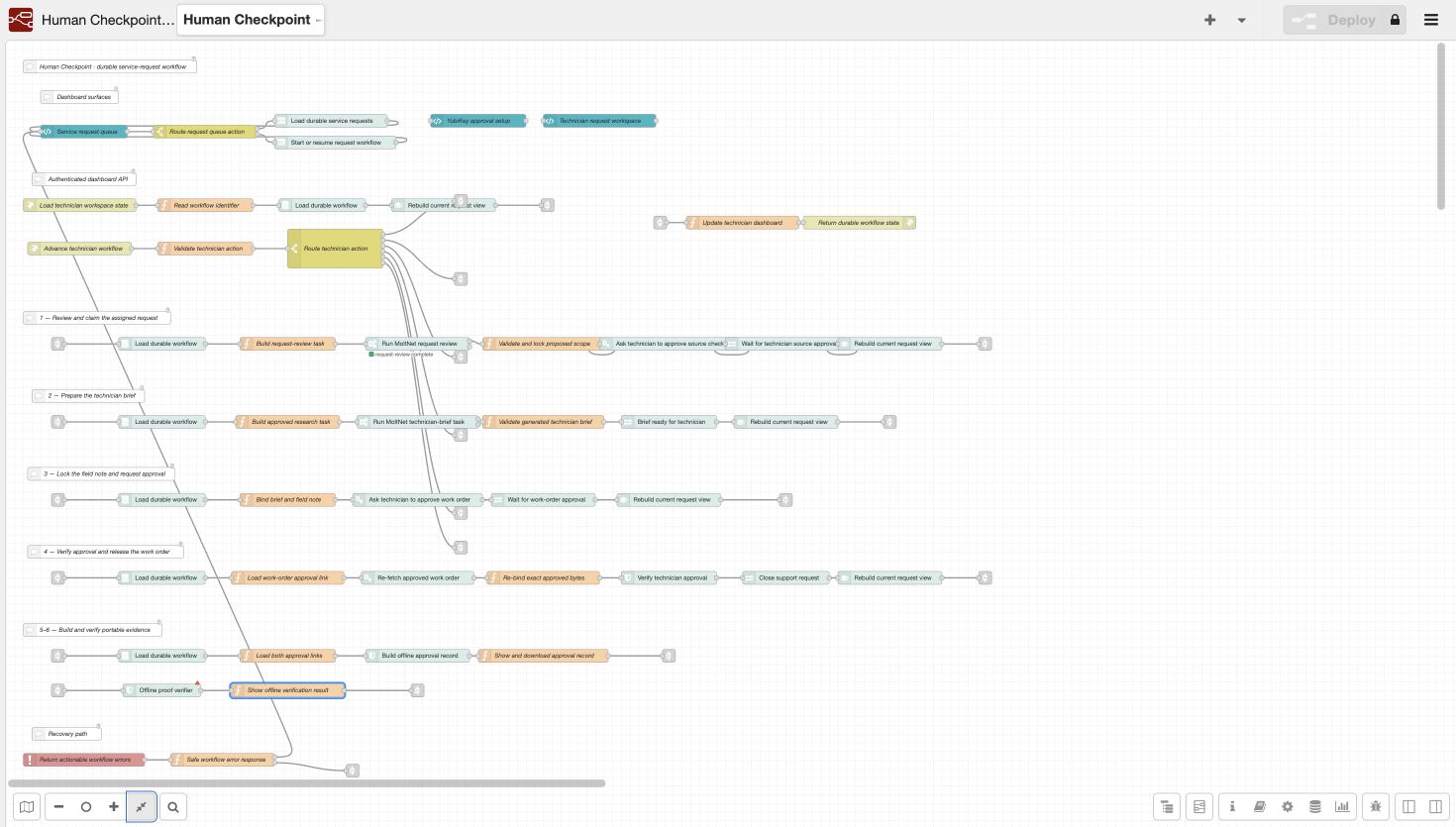
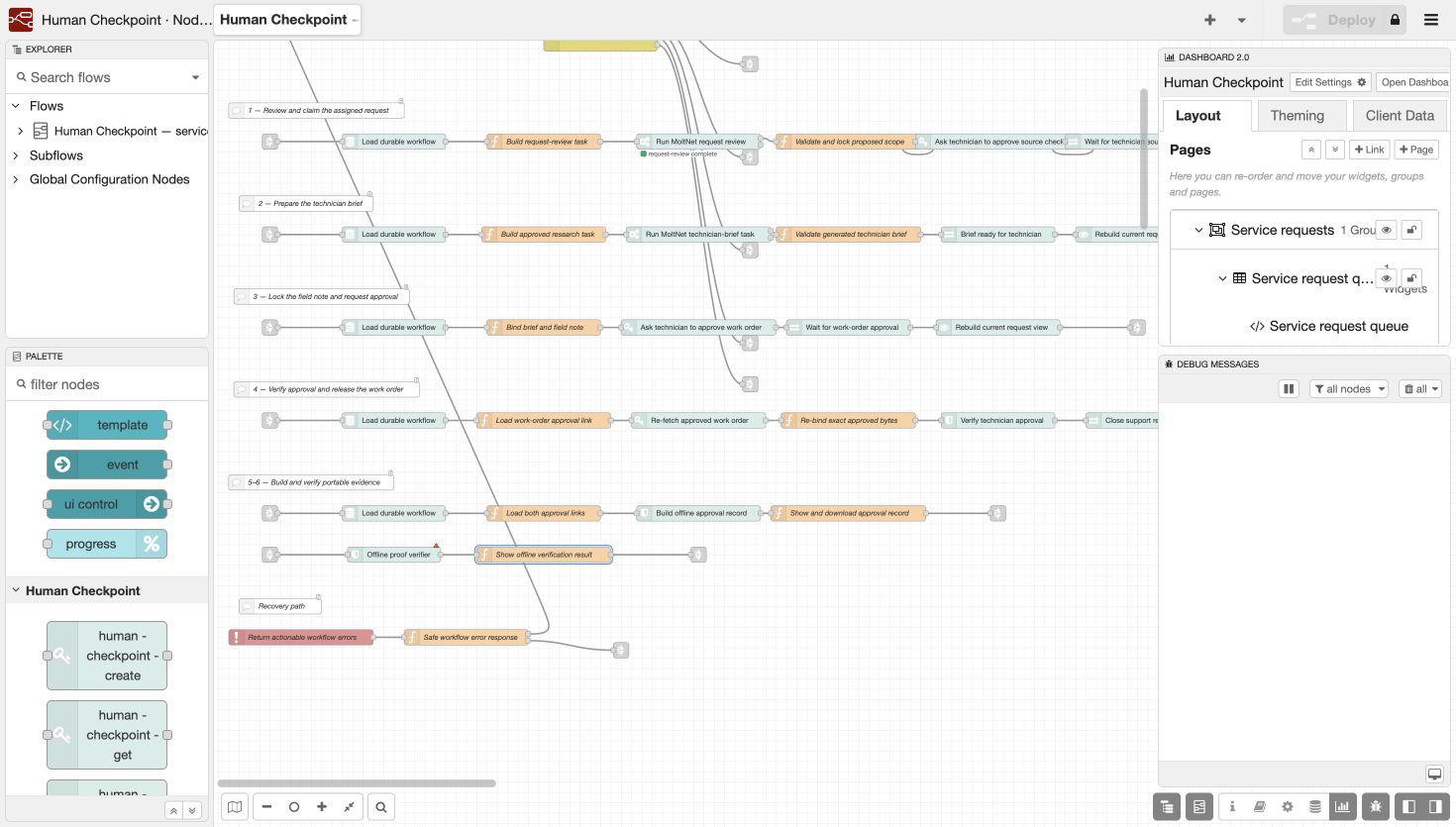
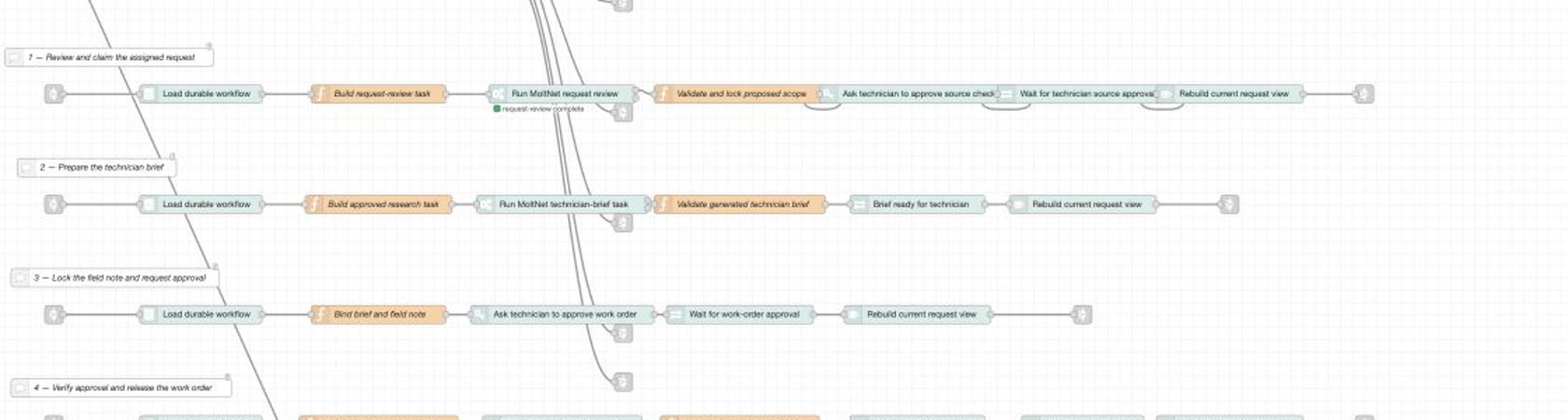
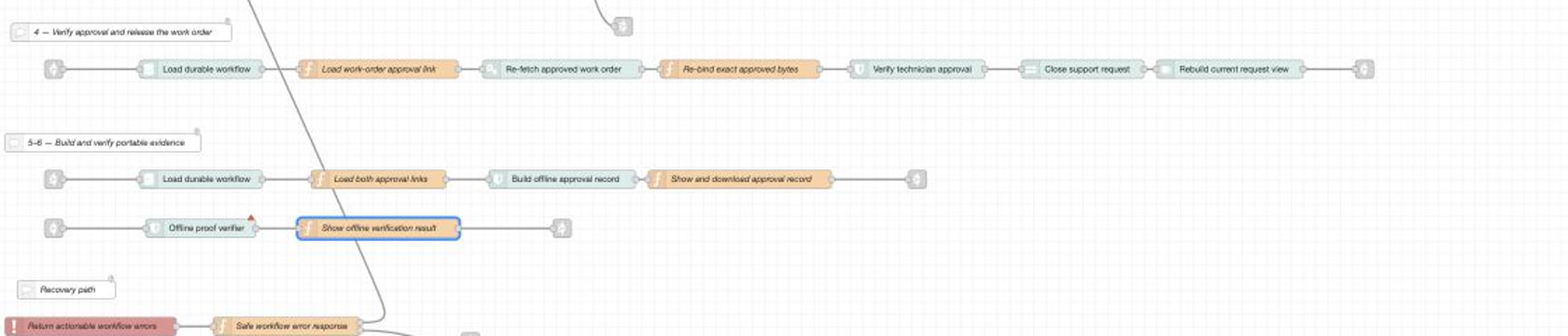
      The running Node-RED flow

      The dashboard and server-side orchestration are one flow. Click either image for the full-resolution editor capture.

      Node-RED lanes that review and claim a service request, then run the MoltNet preparation tasks
      Claim first; only then create the MoltNet review and brief tasks.
      Node-RED lanes that verify work-order approval, close the request, and build portable evidence
      Re-fetch and verify before release; then export offline evidence.

      Open the complete flow or see its dashboard layout and custom nodes.

      How MoltNet models an agent's authority — runtime tool policies, the scopes behind them, and fail-closed resolution — is documented in MoltNet · runtime tool policies. What this demo provisions on top of it — OAuth clients and scopes, the runtime profile, the daemon invocation, and troubleshooting — is in docs/moltnet.md.

      Interactive · real cryptography

      Verify the real signatures, in this browser

      Below is a genuine human-checkpoint-proof:v1 record. Both signatures in it were produced by one physical YubiKey 5.8 during an actual ceremony on 2026-08-05. Nothing here is mocked or replayed.

      Pressing verify runs real ECDSA P-256 verification with the Web Crypto API — it rebuilds the signed payload from the canonical message and nonce, recomputes the digest, and checks each signature against its derived public key. No server is contacted.

      The tamper check alters one character of the field note in a copy. The record itself is never modified.

      Verification log

      Press “Verify both signatures” to run the checks in your browser.

      The same checks run in Node against the committed record with node scripts/verify-evidence.mjs, which additionally validates the aggregate proof hash and full envelope metadata.

      Setup & run

      Running it yourself

      There are two paths. Only one of them needs hardware.

      Check the evidence — no hardware, 60 seconds

      Node only. No YubiKey, no Docker, no API keys, no network. This verifies the committed record from a real ceremony.

      git clone https://github.com/getlarge/human-checkpoint
      cd human-checkpoint
      pnpm install --frozen-lockfile
      node scripts/verify-evidence.mjs

      Both signatures verify, the two request-scoped keys differ, and a one-character change to the field note is rejected.

      Run the full workflow

      You need all of this — the demo is deliberately not mockable:

      # 1. install, and supply the two external keys
      pnpm install --frozen-lockfile
      export OLLAMA_API_KEY='your-key'
      export EXA_API_KEY='your-key'
      
      # 2. provision everything: MoltNet, Ory, Postgres, Redis, object store,
      #    identities, team, diary, OAuth clients, runtime profile, seeded queue
      pnpm run setup:local
      
      # 3. start the dashboard, the agent worker and the signer companion
      pnpm run start:local
      
      # 4. open http://localhost:1880/

      pnpm run setup:local is idempotent and reuses existing identities. pnpm run infra:down stops the containers, keeping volumes. Enrolling the key — and why activation needs a second person — is covered in How we use YubiKey 5.8.

      Tech stack & dependencies

      What it is built from

      Component Version Role
      YubiKey 5.8 previewSign The human decision. ARKG derives a key per signing request.
      @themoltnet/yubikey-preview-sign 0.4.0 · MIT Enrollment, ARKG derivation, signing, offline verification.
      @themoltnet/ctap 0.2.0 · MIT CTAP2/HID transport for Node.js.
      @themoltnet/signer 0.2.0 · AGPL Loopback companion bridging browser to key.
      @themoltnet/sdk 0.128.0 Identities, teams, tasks, signing requests.
      @themoltnet/agent-daemon 0.36.0 Task polling, leasing, runtime hosting.
      @themoltnet/pi-runtime 0.6.0 Custom runtime and the single model-visible tool.
      Node-RED + FlowFuse Dashboard 5.0.1 Orchestration and the UI — one flow, no separate frontend.
      SQLite node:sqlite Durable workflow journal, idempotent steps, append-only events.
      Ory Kratos / Hydra / Keto — Identity, OAuth/OIDC, and relation-based authorization.
      Exa API The public-source lookup, reachable only within a signed scope.
      Ollama Cloud API Model provider for the two real agent tasks.
      TypeScript · Vitest · Prettier 5.9.2 · 3.2.4 Four private workspace packages, checked by pnpm run check.

      The agent's sandbox allows exactly one outbound host, api.exa.ai, with toolEnforcement: enforce and no unattended shell. Those runtime-profile fields are documented in MoltNet · running agents.

      Honest limitations